Siri AI, Explained: What Apple's Rebuilt Assistant Actually Does in iOS 27
Apple has rebuilt Siri from the ground up. Here is what the new assistant can do, which devices get it, and the fine print Australian users should know before they update.
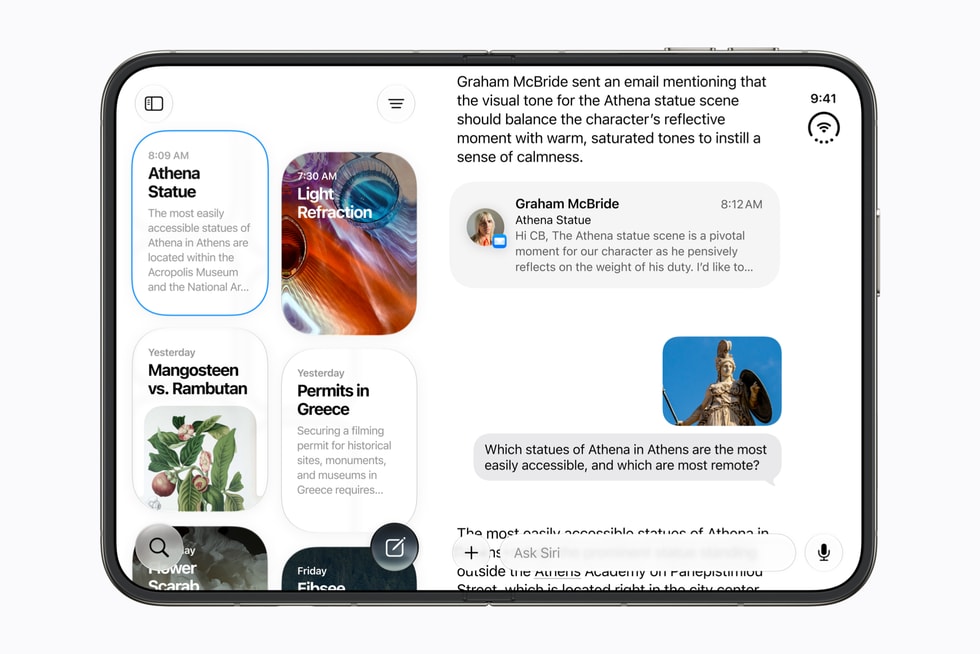
For more than a decade, Siri has been the part of the iPhone people apologised for. It set timers well, misheard everything else, and sent you to a web search the moment a question got interesting. With iOS 27, Apple is trying to close that chapter. The company calls the result Siri AI, and describes it as "a profoundly more personal, capable and conversational assistant". That's a big claim. This is what the new Siri actually does, what it doesn't do yet, and what Australian iPhone owners should know before they tap update.
What is Siri AI?
Siri AI isn't a tweak to the old assistant. Apple has rebuilt it on the next generation of Apple Intelligence, the company's suite of on-device and cloud AI models. Apple first previewed it at WWDC in June. It then became the headline software feature of the September event, where it launched alongside the iPhone 18 Pro, the iPhone 18 Pro Max and Apple's first foldable, the iPhone Duo.
The rollout began in beta on 14 September, a day before iOS 27 itself became available on 15 September. That "beta" label matters. Apple is signalling that Siri AI is still being refined in public, and behaviour will likely change in the months after launch.
The three big ideas
Apple frames the new Siri around three capabilities. Together they explain why the assistant feels so different from the old one.
1. Personal context
The old Siri knew almost nothing about you beyond your contacts and calendar. Siri AI can draw on the information already on your device, including messages, emails, notes, photos and files, and answer questions that depend on it. The classic example is asking when a friend's flight lands, when the details are buried in an email thread from weeks ago. Siri AI is designed to find that information and act on it, without you remembering which app it lives in.
Apple says this happens with privacy at its core. Much of the processing runs on the device. Requests that need more computing power go to Apple's Private Cloud Compute servers, which the company says don't store your data.
2. Onscreen awareness
Siri AI can see what's on your screen and work with it. If a friend texts you an address, you can ask Siri to add it to their contact card. If you're reading an article in Safari, you can ask a follow-up question about it without copying and pasting. On the iPhone Duo, Apple demonstrated this with Split View: you talk to Siri on one half of the screen while it looks at content on the other.
3. Broad world knowledge
The new Siri is also far better at general questions. Instead of reading out a list of web links, it's built to hold a proper conversation, handle follow-up questions and give direct answers. In practice, this is the capability that puts Siri in the same conversation as ChatGPT, Gemini and Claude.
Meet the Siri app
For the first time, Siri has its own app. It gives you a place to type rather than talk, scroll back through earlier conversations and pick up where you left off. That makes Siri a lot more useful in the situations where speaking to your phone isn't practical, like on the train, in the office or late at night. It also makes Siri feel more like a chatbot you can return to than a voice prompt that disappears once it has answered.
Writing tools get the same treatment. Apple showed Siri drafting and rewriting text inside other apps, so you can ask for a tighter version of an email or a friendlier tone for a message without leaving the thread.
Beyond the iPhone
Siri AI isn't limited to phones. Apple is bringing it to:
- Mac, with macOS 27, including the new Mac mini and Mac Studio
- Apple Watch, with watchOS 27 on Apple Watch Series 12 and Apple Watch Ultra 4
- AirPods: when paired with an iPhone running iOS 27, AirPods 5 give you hands-free access to Siri AI, including answers that draw on your personal context
AirPods are arguably where the new Siri makes the most sense. If you can ask a genuinely capable assistant a complex question while walking, cycling or cooking, without taking out your phone, the idea of an "AI companion" starts to feel less abstract.
The fine print
This is the part that doesn't make it into the keynote, but it matters if you're deciding whether to update or upgrade.
- It needs an Apple Intelligence-capable device. Older iPhones that can't run Apple Intelligence can install iOS 27 but won't get Siri AI. Your device also needs to be set to a supported language.
- It's still in beta. Expect rough edges, missing features and changes through updates.
- There are daily usage limits. Apple says features that rely on server-side models are subject to daily usage limits. That includes Siri AI, intelligent photo editing tools, Image Playground and the AFM 3 Cloud models in Shortcuts. Apple hasn't published exact caps, so heavy users may run into them.
- It's not in the EU yet. Siri AI won't initially be available in the EU on iOS, iPadOS and watchOS. This doesn't affect Australians at home, but it's worth knowing if you're travelling in Europe on an Australian device and expecting everything to work the same.
- There's an age limit. Siri AI isn't available for users under 13.
What it means in Australia
Australian English is well served. Australia has been an early market for Apple Intelligence features, and Siri AI is available here from launch. There's no extra charge: it comes free with iOS 27 on a supported device.
The bigger question for most people is hardware. If your current iPhone doesn't support Apple Intelligence, Siri AI is effectively Apple's strongest reason yet to upgrade. The iPhone 18 Pro range and the iPhone Duo (from A$3,499, arriving 23 October) are the showcase devices. But any Apple Intelligence-capable iPhone will get the core experience.
Should you turn it on?
If you have a supported iPhone, yes, with sensible expectations. Personal context and onscreen awareness are real, useful changes, and the Siri app finally gives the assistant a home. Keep in mind that this is a beta, that heavy use may hit daily limits, and that Apple is asking for a lot of trust with your personal data. Its privacy architecture is more transparent than most, but it's still worth checking the Apple Intelligence and Siri settings after you update and deciding which apps you're comfortable letting Siri read.
After fifteen years of being the punchline, Siri has something to prove. For the first time in a long time, it looks capable of proving it.
Source: Apple Newsroom Australia